

I had the idea to add a new photos library to my Plex Media Server which contained about 16000 pictures I collected over the years.
What I had not predicted was that the Plex Sqlite database does not like such libraries. Adding this library resulted in my server becoming unavailable from remote locations and media not wanting to play on local machines.
Luckily, Plex has an automatic database backup running every 3 days. In order to restore the database(s), you need to:
- Stop the Plex Media Server service/docker.
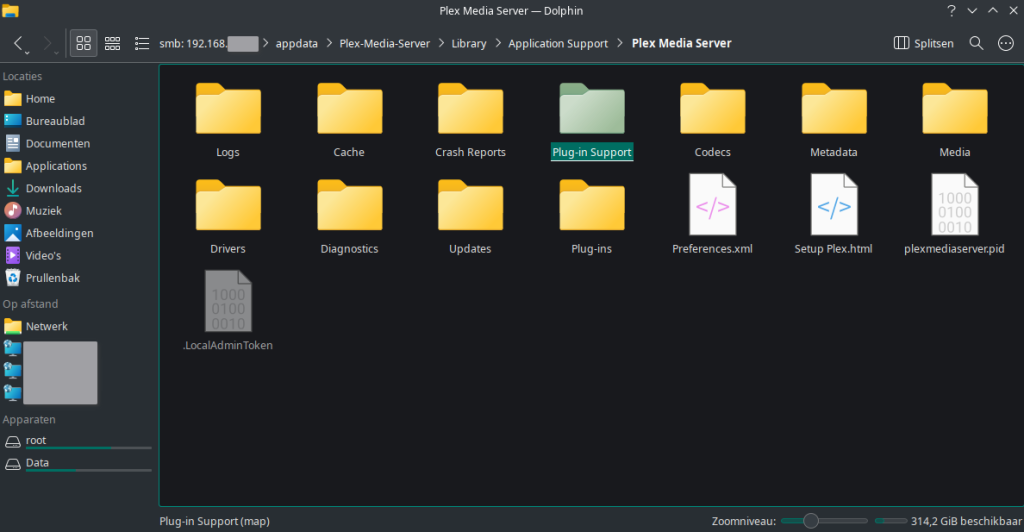
- Browse using a file manager or SSH to the following folder:
- …/Plex-Media-Server/Library/Application Support/Plex Media Server/Plug-in Support/Databases/
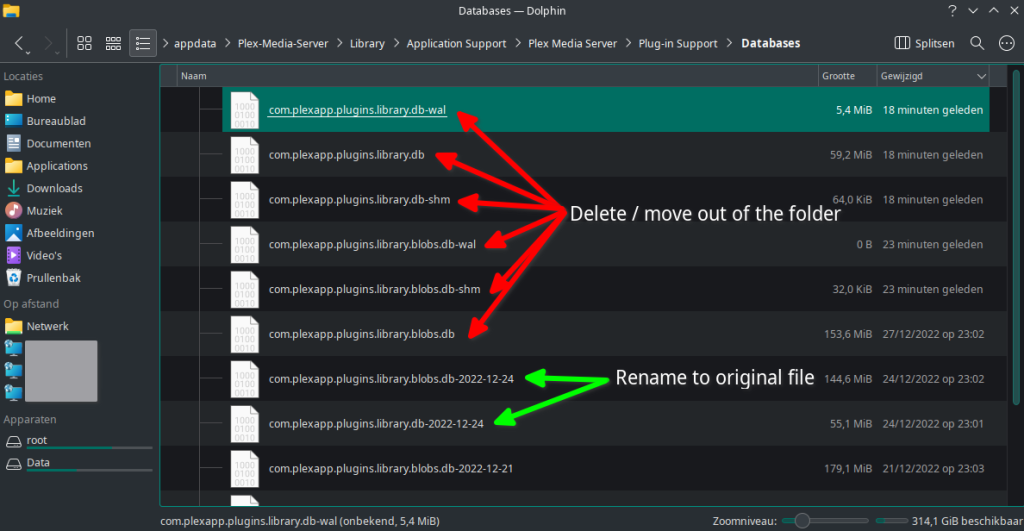
- Move or delete the 2 databases:
- com.plexapp.plugins.library.db
- com.plexapp.plugins.library.blobs.db
- Also move or delete any remaining files with “-shm” or “-wal” in the name.
- Rename the 2 backup databases to the original files:
- …library.blobs.db
-yyyy-mm-dd - …library.db
-yyyy-mm-dd
- …library.blobs.db
- Start Plex Media Server.
Your Plex Media Server should run just as you left it on the last backup.